Wednesday, April 17, 2013

New Additions to the Program!


Much progress has been made since our last post! The website is up and running (stay tuned for a post by Amanda soon) and there have been many adjustments to my cistern interaction program.

The first update is the lighting. It now is more accurate and the cistern does not get darker as we zoom in and out. Here are some screen shots:


The next big change is a lot of re-factoring and code organization. It is now much easier to read and understand, and all the cisterns load upon the page loading. This way, the user can scroll over whichever cistern they would like to view and a preview will show up. Upon clicking the new cistern, it will load immediately instead of scanning the entire obj files again. This is of course a much better design for interacting with the cistern! Stay tuned for a post when the link has been updated to host the new additions.

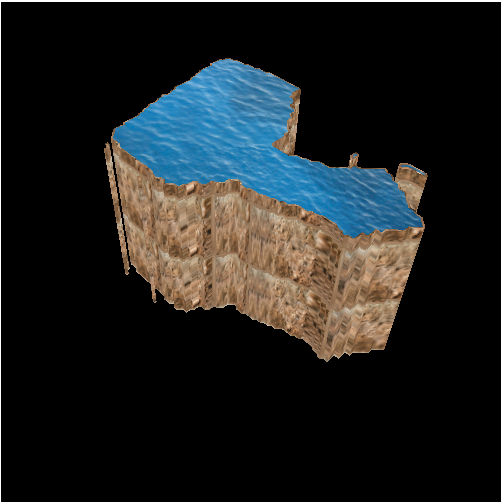
Lastly, I have added code to handle GIS data of Malta. When the page loads initially, it is the map of Malta. On the map are several markers representing the locations of the cisterns. For now, they are colored differently based on the cistern location, but eventually I am going to implement "picking" so the user can click on the markers and the program will load the cistern in that location. Here are some more screen shots:


Added markers:


Cool bugs!


-Vanessa


Tuesday, March 12, 2013

A Start on the First Education Module


We are planning for the website have a few educational modules, and we are making some progress with the first! This first module will be geared toward 7th-8th grade Social Studies, offering lesson plans for the classroom and some online interactive activities a little further down the road. 

So far, we are just working on the lesson plan. It involves two 45 minute class periods devoted to learning about Malta’s past, present, and predicted future with regards to water and conservation techniques.

We are making great progress with the project! We have planned two major activities (one for each day) along with other class discussions that we will incorporate into the final lesson plan.

The first activity involves students developing a timeline of Malta’s major events that connect to water availability or lack thereof (model pictured above). The activity involves breaking the students into groups and assigning them a historical event or period to read about. They will then summarize the three main points and draw a picture to represent the period. Finally, they will hang the events in chronological order on a clothesline to create a clothesline timeline. As we started developing the activity further this week, we have run into some problems with connecting all of the major events in Maltese history with water. For example, the Neolithic Period (5000 BCE - 2500 BCE) is really important in Maltese history. These people were the first known inhabitants of the island, and many interesting underground temples with sophisticated engineering. After visiting the most famous of these temples, the Hal Saflieni Hypogeum in Malta a few days ago and being fascinated by the extensive architecture of these early engineers, we really want to incorporate this into the timeline activity. Here's a picture of the hypogeum we visited:


However, it's difficult to draw a clear connection to water. We are doing more reseach about a prehistoric cistern that was possibly use prehistorically in the hypogeum. Even if an event doesn't directly relate to water, there are various themes that we've identified to be indirectly related throughout history. Some themes that relate to water are cultural influences, agriculture and land fertility, population trends, trade, irrigation systems, and practices involving the importation, extraction, and purification of water. This activity aims to approach each of these themes and touch upon how it relates to and impacts the historical and current usage of water in Malta.

Our second activity relates directly to cisterns and water consumption, and allows for students to compare and contrast various water conservation techniques. We have been working with Andrew for this activity because he is developing a WebGL program based upon Vanessa’s 3D simulation. His activity allows for students to select the number of people in their family, if they have a dishwasher, and other similar selections related to water. While it is still in development, we are working with him to correlate our activities so that a possible online homework assignment can be supplemented to our lesson. With the in class activity, students will need to calculate their water usage with basic math through a series of questions. Based on the students water usage, they will take a certain number of water droplets from the pile in the cistern.


It will clearly be more complex than the picture above...but it gets the idea across, right? We want the students to be able to identify their water usage and be able to make decisions on water conservation techniques to preserve the water stored in their cistern (especially during dry months). More updates on this coming soon!

-Vanessa & Amanda

Wednesday, March 6, 2013

Our First View of a Real Cistern!


Today was our first day of gathering data from the cisterns. We took a ferry to the Gozo fields and were able to successfully obtain two cistern mappings. The euphoria and excitement levels were very high today, and we had an interesting day of rain, makeshift shelters, and even seeing a fish!

We began our journey at 7:30 AM this morning and we got back around 5 PM. We took a bus to the ferry, and then a bus again to the Gozo fields.

Ferry from Malta to Gozo
The view was beautiful, there were luscious green fields and flowers all around us. We were thrilled to get our first view of a real cistern!

Our First Experience in the Gozo Fields
Before we got settled in, we had to take a "rainbow" picture. 

ICEX Team (minus me, Jane, and Spencer) 
It was raining when we arrived so we had to brainstorm ways to protect the generator. Luckily, there was a shed with metal scraps and wood pieces so we made a makeshift shelter! We originally set up our control box inside a nearby shed, but when it stopped raining we relocated to be closer to the cistern.


Makeshift Shelter for Generator
While some were setting up the equipment, Jeff was helping Amanda and I set up the log books. We keep one log book for drawings of the sonar scans and the ROV heading.

Setting up Log Books
 Here is the outside of the first cistern we mapped. The cistern was circular and we took several scans at the different levels. The cistern appeared to taper as we moved up the cistern.

Gozo Fields Cistern #14
 Everyone was working hard to help the cistern mapping go smoothly, and it did! Our research partner, George Azzopardi, was very interested in determining if two of the cisterns were connected. We were able to find an interesting passageway in the direction of the projected cistern. The passageway was towards the upper part of the cistern and wasn't full of water, so we were unable to determine a full path to the adjacent cistern. It will be exciting to see how the sonar readings turn out!

Overview of the Group
Log Books all Set Up!

Setting Up
Deploying the ROV
And last but not least, we spotted a fish in the second cistern! The picture from the GoPro didn't come out that well but tomorrow we are going back to the Gozo fields and I am hopeful we will spot another fish. A fish was very unexpected to see in a cistern and I'm curious as to how it got there!

Super Cool Fish
Today was an amazing first day of mapping the cisterns and I am looking forward to going back out tomorrow! I'm currently working on adding more cisterns to the WebGL code and those should be up and running in the next few days!

Wednesday, February 27, 2013

Update on Cistern GUI & Lighting and Intro to Teaching Module


Here is an update on the 3D data visualization project! I have been working on fixing the lighting, and I also added functionality to select between the different cistern models. Available models are: M'dina Cathedral Sacristy, Case Cutietta, House Ta'anna, and Convento Dei Cappuccinni.

Here is a live link: http://users.csc.calpoly.edu/~zwood/ICEX/Cistern/shading.html but it does not include the updated lighting code as of now. It will be updated soon!

If you have Safari and the link says “Could not initialize WebGL” refer to the following steps:
1. In Safari, open the Safari menu and select Preferences.
2. Then, click the Advanced tab in the Preferences window.
3. Then, at the bottom of the window, check the Show Develop menu in menu bar checkbox.
4. Then, open the Develop menu in the menu bar and select Enable WebGL.

Here are some screen shots:

M'dina Cathedral Sacristy
House Dar Ta'anna
Convento Dei Cappuccinni
Case Cutietta
Case Cutietta

I have added functionality to remove the water, the textures, and the lighting as desired by the user. My next task is to add an overview of Malta, and allow the user to see the overview of the location of the different cisterns, and then be able to select which one they want to view. I am very excited to get started on this project and I look forward to sharing the results! This is going to be my final project for our graphics class.

Amanda and I are working to develop a teaching module that relates to the history of water in Malta, and explains the importance of water conservation and various conservation techniques. We have created two activities that will be part of our two, 45-minute lesson plans that will be available on the Water Ways website!

The first activity is called Clothesline Timeline of Malta’s History with Emphasis on Water and Society. The students will be given a few paragraphs on different topics about Malta's history. A few of the topics include the Knight's of St. John, French occupation, and World War II. We talk about the history as well as more recent water events. The students will then summarize the topic with a few sentences and pictures on a piece of paper, including the name and date of the event. These papers will be put together on a clothesline or string with clips attaching the papers in the order the events occurred. The students will then introduce the topic they read to the entire class so everyone can learn about all the different topics.

The second activity is called the The Effect of Water Scarcity in Malta. Students will be divided into groups, which will be called “neighborhoods.” In each neighborhood, the students will have a set amount of paper water droplets representing their water supplies. The students will be given a sheet which allows them to select how often they use water (from showering, gardening, etc). They will then have to calculate how much water they use per day and determine if between their neighborhood they will have enough water in their supply. Since the activity focuses on Malta, water shortages will be faced. The students will have to brainstorm different water conservation techniques as well as different water collection techniques. The students will have a follow up homework assignment that provides data from water usage and consumption in Malta.


The learning objectives for this activity are as follows:

1. Further students understanding of water scarcity in Malta
2. Help students realize the importance of water preservation
3. Understand the effect of personal actions with relation to the water supply

Andrew is going to make a graphical model of this activity as part of his final graphics project, so we are hoping to add this as an optional online or take-home activity for the students.


Our activities will be combined with homework assignments and descriptions for the teachers. This teaching module is part of our final project for our global engineering course. Amanda and I are excited to continue our external research and learn more about Malta as we get further and further along with our project.


-Vanessa

Monday, February 25, 2013

New (temporary) website is up!

I can’t believe there’s only one more week until we leave for Malta! We’ve done a lot in the past couple of weeks to prepare. Yesterday, the whole Cal Poly team went to practice flying the ROV at the pool. It was great to get more experience setting up the ROV, which I hadn’t done before. I also got to practice driving it around the pool, while other people traded off taking sonar scans and recording the bearing, time, depth, and sketched out the pool based on the scans. Of course, it will be a lot more difficult when we’re in Malta and we can’t see the ROV when it’s in the cistern!

I’ve spent this past few weeks working on the Water Ways website. We are still waiting on the permanent server but for now we are using Omeka’s premium package to host the site temporarily. This means that we have to use one of Omeka’s “themes” for the layout and design of the site, and have extremely limited authority to change it. But, I was able to pick a good theme to match our projects goals. Although we still don’t have everything up, we have a great start.The first step: finalizing the logo! With the input of the rest of the team and months of deciding, I finally settled on this final logo design:


Along the top of the website is the horizontal primary navigation bar. It has pages about the site, about our partners, our research, teaching resources, and a contact page.

About the site: I put information here about the “Water Ways” site, like why we are examining the relationships between water, society, and technology and why these topics help determine the future of the Mediterranean. I also put information about ICEX and the great experience it creates for engineering students to get practice working in a foreign country.

Partners: Here I listed the sponsors: National Science Foundation (NSF) and Collaborative Research Experiences for Undergraduates (CREU), and how their goals coordinate with our program goals.

Research: Right now, I have the research broken up into three groups: Data collection, Interpreting data, and 3D cistern visualizations. Inside data collection users can explore students at work, sites we visit, or the ROV sonar scans. Inside the 3D cistern visualizations, they can explore 5 different cisterns that we have collected data and created visualizations out of. Vanessa took screenshots from different views of her WebGL cistern visualizations to display on the website.


Teaching Resources: still under construction. Vanessa and I are currently working on the first Educational Module that will go here, which will be a two-lesson plan for 7th-8th grade Social Studies classes, incorporating Maltese water conditions in the past, present, and future.

The website is no where near complete, but we have a great start to showcase some of the work we’ve done so far. I’ll be working on it more, and will have a lot to add after I actually visit Malta next week!Here's a screenshot of the homepage, which has featured and recent items posted. 


Check out the website here: icex.omeka.net

-Amanda


Tuesday, February 19, 2013

We are Live!

I added a few more features to the cistern. I redid the user interface and changed the background color to white. We also hosted it on the web so you can see it here: http://users.csc.calpoly.edu/~zwood/ICEX/Cistern/shading.html

I would appreciate any comments or suggestions you have about the cistern. Since Zoe updated the link I have lowered the water so it looks like this:

I also made it so the camera started zoomed out more. I'm also working on making the lighting better, since right now it moves when you zoom in/out. I'm going to make it constant and find a good location for it!

Amanda and I have also been working on the Water Ways site and we are trying to get this launched as soon as we can. We are hoping we will not have difficulties when merging WebGL with Omeka.

-Vanessa

Saturday, February 2, 2013

Texture Coordinates Working

I finally got the texture coordinates working! It was a silly bug but took forever to find since I have never done graphics before, and so I didn't understand the mapping of the texture coordinates until now.

Without water, without shading


Without water, with shading

As you can see, I also added the option to select "show water" or don't show water so that the user can get a better idea of what the cistern looks like.

With shading

With shading

Without shading

Without shading
I am very excited to finally be not looking at weird small squares everywhere, and actually looking at the water textures. I have some goals for the next few weeks but I need to have a meeting with Zoe to determine which are the most important ones.

Goals:
1. Make the water transparent
2. Make the user interface better and prettier (title of Cistern, instructions for how to move cistern, etc)

-Vanessa